Also an update : i am working on three projects/powerpoints/essay type work, will take a while and im not sure how i can get powerpoints on this blog or if its easy to get a whole word doc on here. Ill try get some on here otherwise, keep you posted.
love my games, love my anime, love my friends; we are who we are, get up and show me some pride!
About Me
- Wolfsaiyan
- yo i'm Joe, love my games, love my warhammer, my anime, and all the great people in my life - find my stuff here
Wednesday, 10 November 2010
3-D welding and a quick update
Ok first thing, today in 3-D max we learnt to "instance copy" (this involves copying an object; then any changes you make to the copy, affect the original model) and welding, this involves getting two objects close to each other, higlighting the vertexes along an area, then welding them together to make a single shape/model. Below is the ship i made doing this (so its perfectly symmetrical). Enjoy:
Tuesday, 2 November 2010
Desktop Project
*** ***
I thought it would be a good idea to link all my pages for the project on this one page so they would be easy to find:
Collage
http://wolfsaiyan.blogspot.com/2010/09/u19-desktop-genre-collage.html
Mindmap
http://wolfsaiyan.blogspot.com/2010/09/mels-work-desktop-project-mindmap.html
Desktop Designs
http://wolfsaiyan.blogspot.com/2010/10/uploads-finally-working-design-for.html
Exploring Fonts image:
Final Design
http://wolfsaiyan.blogspot.com/2010/10/desktop-final-image-and-review.html
Evaluation
http://wolfsaiyan.blogspot.com/2010/11/evaluation-of-final-desktop-design.html
I thought it would be a good idea to link all my pages for the project on this one page so they would be easy to find:
Collage
http://wolfsaiyan.blogspot.com/2010/09/u19-desktop-genre-collage.html
Mindmap
http://wolfsaiyan.blogspot.com/2010/09/mels-work-desktop-project-mindmap.html
Desktop Designs
http://wolfsaiyan.blogspot.com/2010/10/uploads-finally-working-design-for.html
Exploring Fonts image:
Final Design
http://wolfsaiyan.blogspot.com/2010/10/desktop-final-image-and-review.html
Evaluation
http://wolfsaiyan.blogspot.com/2010/11/evaluation-of-final-desktop-design.html
Evaluation of Final Desktop design
Now I have uploaded my final desktop design and updated it with my own thoughts and some feedback from class mates, this blogspot is an evaluation of my work with several question I have to answer:
***All of my work for this project is accross my blog along with my own paragraphed evaluation***
*Does the end product match your original intentions?
My final product looks very similar to my original design (See images below). It looks nearly exactly the same as my sketch with some minor changes to make it look better; i.e. proportions, shapes and fonts.
*Is the end product appropriate for your intended audience?
Since I was going for such a large audience to begin with (this desktop could be viewed by a wide range of ages) it had to be clean, nothing explit; all appropriate content, which i achieved. There are Sci-Fi and fantasy elements nothing that could offend someone. However some "older" viewers may not appriciate some of the fonts or the Image of the "warrior" to the right.
*Discuss the technical aspects of your work and highlight the strengths / areas to develop
I have not used photoshop often, I don't know much of the skills, however I think I have made very good use of layers (theres about 20 or so in there separating all my different objects and colours) Also on my character i think i have made basic use of shading, i have used the pen tool, magic wand tool and FX effects such as dropping shadows and beveling my image. The only equiptment i used was the camera to take the picture of my final sketch.
*Discuss the content / style of your work
The overall style is mainly Sci-fi, although the warrior looks more fantasy than "spacey" but with the time limit it works well enough. I found a decent substitute for stars with a brush i found, giving an "aura" or lighting like effect, again could have done more with it. however the final design has stuck with the research and content. e.g. the 2 images below: one is an "aura"/shape and the other is off a character on the right, just some of my inspiration:
*Did you encounter any problems when creating the product? if so how were they resolved?
One major problem i found was that because I hadnt outlined my final sketch photoshop was having trouble picking up the image; so Mel showed me a way to "push out" or "bolden" the lines in the picture using a setting in photoshop (that neither of us cannot remember, i will experiement to find it).
*What have you learnt from this experience?
The main thing i have learnt is that photoshop has so much more to offer and it is going to take me a while to learn how to even find most of it; however this project feels like a start.
*What skills have been developed throughtout this process?
Increased my photoshop skills slightly, and also it has made me take a more serious look on my sketching and concept, which i will now work on.
*Did you meet the deadline?
Yes, however i think i could have spent longer on it now, rather than panicing.
*Did you have any problems with time management?
No i was ahead of the deadline most of the time, i should have left more time to work though.
*If you had the opportunity to make this product again would do anything different? And are you jappy with overall product?
I would take more time to learn the tools and create a much less clattered concept. Look at more tutorials and examples to help me.
Saturday, 23 October 2010
Some Weekend news and experiences, its relevant
as the title says this post is relevant to my course.
First of this weekend i am watching Blizzcon (huge 2 day event for all blizzard games: WoW, Starcraft and diablo) and there are alot of panels / QnA about how they make their trailers, models, art, etc; really interesting stuff (will try out the starcraft 2 editor myself at some point). Lots of great stuff coming out here
Second After seeing this video:
(fanart of a League of legends character) done in photoshop in (apparently) 1hour and 20mins! I can see how simply skills have been utilised and are put to absolutly amazing use; i will at some point make a profile on deviant art and try do more work myself, (once i buy photoshop again -_- damn these errors...).
Thats all for now folks, i will be updating over the halfterm with any little tutorials i get, work i have enjoyed looking at and the history of animation work i ahve to put up on here.
First of this weekend i am watching Blizzcon (huge 2 day event for all blizzard games: WoW, Starcraft and diablo) and there are alot of panels / QnA about how they make their trailers, models, art, etc; really interesting stuff (will try out the starcraft 2 editor myself at some point). Lots of great stuff coming out here
Second After seeing this video:
(fanart of a League of legends character) done in photoshop in (apparently) 1hour and 20mins! I can see how simply skills have been utilised and are put to absolutly amazing use; i will at some point make a profile on deviant art and try do more work myself, (once i buy photoshop again -_- damn these errors...).
Thats all for now folks, i will be updating over the halfterm with any little tutorials i get, work i have enjoyed looking at and the history of animation work i ahve to put up on here.
Wednesday, 20 October 2010
3-D animation Basic
So from the text and textures we come to animation! To use animation in Max i use the "auto key" to input actions along a timeline, that i could then play as a video; So i added in a couple of object and used the "name" i made earlier. So here is the video of the animation i made, later i will be designing my own: enjoy:
I would also add the second animation i created in the afternoon... however, it didnt go very well and this one does a better job ^^
3-D Max, text and fonts
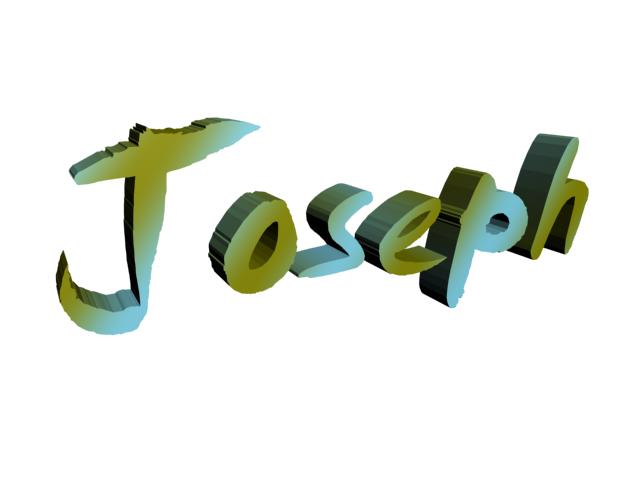
In 3-D max today we wrote our name!, theres a tab in the objects bar that lets you make Splines, (2-D objects in 3-d space), from this we created 2-D text, then turned it into an editable mesh; giving it polygons. From there we extruded the shape, making them 3-D. After that we messed around with the settings in "materials" (like i did with my car) and used a new option in there "difuse" it lets us put a texture on the objects. Below is a screenshot from max and 7 different textures i made (my favourite is the 6th down, has a lava type of effect ;). Enjoy:
Tuesday, 19 October 2010
Desktop: FINAL image and review
So after 6 weeks of work, planning, design and photoshop work here is my finished project, the final product. In photoshop i made use of alot of new skills and tools, magic wand (tolerance settings), the pen tool, inserting my own fonts, and ***insert what mel did here*** (something that outlined my picture of my drawn design) that really helped me outline my character on the desktop. here is the final piece (all pieces of design are in earlier blogspots, each with there own descrition etc) Enjoy:
I am quite happy with my final desktop:
There is plenty of room for the icons, it has the shipley college logo, the words Media Suite; some rules for the college (single words) and it has turned out very close to my design. The "guardians" colours i did well, adding darker brushes, adding shade etc. The glow on the centre affecting the guardian and asteroids worked better than expected. Now comes the bad news: I think it looks abit too colourful, some of the "rules" are not too readable, some of the words dont fit into the "sci-fi" style (however they were meant to stand out).
The "guardian" aswell does look abit garish compared to how i designed it, abit too bright and not spacey. I couldnt get the star-like background either, and the asteroids look abit rushed.
All in all however, i am happy with my desktop and really enjoyed doing it ^^
*** Review/Feedback from Group***
Many said how some of the colouring with the 6 points is too dark, so as you can see in the image above (e.g. with misconduct, used to be black) i have made changes accordingly, few other issues came up; as i said i can do better and have plenty of time now to learn more about photoshop, as i am only scratching the surface.
*** UPDATE*** i acidently saved over my final design with the upgrades, however as i said the only major changes were font colours.
Subscribe to:
Posts (Atom)